


How to Stress Test the Hard Drives in Your PC or Server

You have the latest drives for your server. You stacked the top-of-the line RAM in the system. You run effective code for your system. However, what throughput is your system capable of handling, and can you really trust the capabilities listed by hardware companies?
Why Use SQLIO?
If we want to know the IO ability of our drives, SQLIO makes an excellent tool (like the Federal Reserve, we’ll be running “stress tests” on our drives, not the banking system). You can use SQLIO as an addition to your server set up to find the maximum ability that your drives can handle, which will communicate how effective your server set up is.
As an example, let’s suppose that we have three drives to our server, an F drive, G drive and C drive. If we have our MDF on the F drive, the LDF on the G drive and our OS on our C drive, we can evaluate whether our set up is effective. For instance, if our MDF file is the busiest in terms of writes and reads over our OS and LDF, we would want our MDF file to be on the drive that can handle the highest through put, if we’re aiming for an efficient server arrangement.
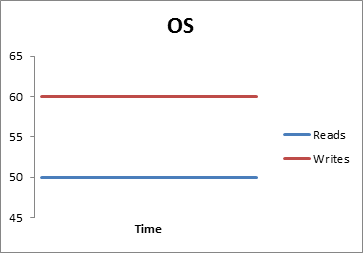


SQLIO helps us determine which drive would be better for our server arrangement. Using the above example with the graphs (representing the writes and reads for the OS, LDF and MDF), since we’re seeking efficiency, we would place our MDF file on the fastest drive since our MDF is the busiest. If our SQLIO analysis showed that F was our fastest drive, we would place our MDF file on drive F.
Awesome! How Can I Obtain SQLIO?
Microsoft offers this excellent tool for free (currently available at the websitehttp://www.microsoft.com/download/en/details.aspx?id=20163). Unfortunately, links at Microsoft can change frequently, so if the above link fails to work, you can Google “SQLIO” and locate the tool from the website.
How Do I Perform A Stress Test?
1. We’ll need to modify the file param.txt, which specifies to SQLIO where to locate the test file. When you load the file param.txt (found in the SQLIO folder), you should see something similar:

For the sake of our test, if your main drive is different, you’ll want to change the location of the drive. Also, depending on how large you want your test file to be, you can change the size of the file (in this case, 4096). Note that if you want to test multiple drives, you can do the same (copy and paste the code below this to save time):
c:\testfile.dat 2 0x0 4096
h:\testfile.dat 2 0x0 4096
i:\testfile.dat 2 0x0 4096
p:\testfile.dat 2 0x0 4096
In the above example, we’ll be testing drives C, H, I and P.
2. Create a batch file titled SANtest.bat in your SQLIO folder (often found in Program Files), as you’ll be running this batch file through the command prompt (shown later). This file can be created in notepad and will be created based on what you’re seeking. Keep in mind, that this file will be the instructions for the SQLIO test on your drives; the longer the list of lines in this file, the more time it will take. However, a long list means that the test is more comprehensive. Depending on what you’re seeking, you may want a long batch file or a short batch file. Below this, I show an example of how each line will look in your SANtest.bat file; the important parameters, I’ll cover:




| Variable | What the Variable Performs |
| -kW or -kR | This specifies the procedure. W will write and R will read. If your disks are read-only, you would only do R. |
| -frandom or -fsequential | This states whether the IO will be sequential or random. |
| -t2 or -t4, -t8, -t16 … | Threads that will be run at the same time. |
| -o1 or -o2, o4, o8 … | The number of outstanding requests. |
| -s90 or -s60, -s120 … | How long the test will take in seconds. I’ve seen suggestions which range from 90 to 120. |
| -b64 | 64kb, which depending on the system, you may want this to be 4kb, 8kb, or cetera. This involves a test of SQL server which would be 8kb and 64kb. |
| -dC | The letter drive for the test. Note that if your drive is F you will want to change this value to -dF (or -dG for a G drive that you want to test). |
After running SQLIO multiple times, the key for a batch file is organization. I’ve found the following code below to be the most useful for a quick test:
sqlio -kR -frandom -t8 -o2 -s90 -b64 -dC -BH Testfile.dat
sqlio -kR -frandom -t8 -o4 -s90 -b64 -dC -BH Testfile.dat
sqlio -kR -frandom -t8 -o8 -s90 -b64 -dC -BH Testfile.dat
sqlio -kR -frandom -t8 -o16 -s90 -b64 -dC -BH Testfile.dat
sqlio -kR -frandom -t8 -o32 -s90 -b64 -dC -BH Testfile.dat
sqlio -kR -frandom -t8 -o64 -s90 -b64 -dC -BH Testfile.dat
sqlio -kR -frandom -t8 -o128 -s90 -b64 -dC -BH Testfile.dat
sqlio -kW -frandom -t8 -o2 -s90 -b64 -dC -BH Testfile.dat
sqlio -kW -frandom -t8 -o4 -s90 -b64 -dC -BH Testfile.dat
sqlio -kW -frandom -t8 -o8 -s90 -b64 -dC -BH Testfile.dat
sqlio -kW -frandom -t8 -o16 -s90 -b64 -dC -BH Testfile.dat
sqlio -kW -frandom -t8 -o32 -s90 -b64 -dC -BH Testfile.dat
sqlio -kW -frandom -t8 -o64 -s90 -b64 -dC -BH Testfile.dat
sqlio -kW -frandom -t8 -o128 -s90 -b64 -dC -BH Testfile.dat
sqlio -kR -fsequential -t8 -o2 -s90 -b64 -dC -BH Testfile.dat
sqlio -kR -fsequential -t8 -o4 -s90 -b64 -dC -BH Testfile.dat
sqlio -kR -fsequential -t8 -o8 -s90 -b64 -dC -BH Testfile.dat
sqlio -kR -fsequential -t8 -o16 -s90 -b64 -dC -BH Testfile.dat
sqlio -kR -fsequential -t8 -o32 -s90 -b64 -dC -BH Testfile.dat
sqlio -kR -fsequential -t8 -o64 -s90 -b64 -dC -BH Testfile.dat
sqlio -kR -fsequential -t8 -o128 -s90 -b64 -dC -BH Testfile.dat
sqlio -kW -fsequential -t8 -o2 -s90 -b64 -dC -BH Testfile.dat
sqlio -kW -fsequential -t8 -o4 -s90 -b64 -dC -BH Testfile.dat
sqlio -kW -fsequential -t8 -o8 -s90 -b64 -dC -BH Testfile.dat
sqlio -kW -fsequential -t8 -o16 -s90 -b64 -dC -BH Testfile.dat
sqlio -kW -fsequential -t8 -o32 -s90 -b64 -dC -BH Testfile.dat
sqlio -kW -fsequential -t8 -o64 -s90 -b64 -dC -BH Testfile.dat
sqlio -kW -fsequential -t8 -o128 -s90 -b64 -dC -BH Testfile.dat
This is also the code we’ll be using to test a drive later in this article to show how to interpret the results (you can copy and paste it for a demo test on your system). Depending on what you want your drives to do, you may want a more comprehensive code with more or less threads and more or less outstanding requests.
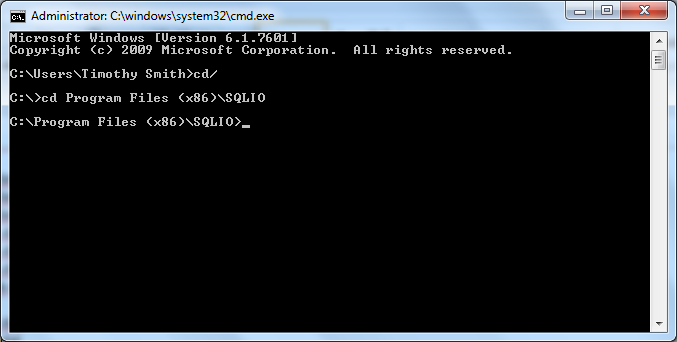
3. Time to run our test. The following screenshots show the process. You will go to the command prompt, find the location of the file SQLIO, and run the test by typingsantest.bat > results.txt and hitting enter.
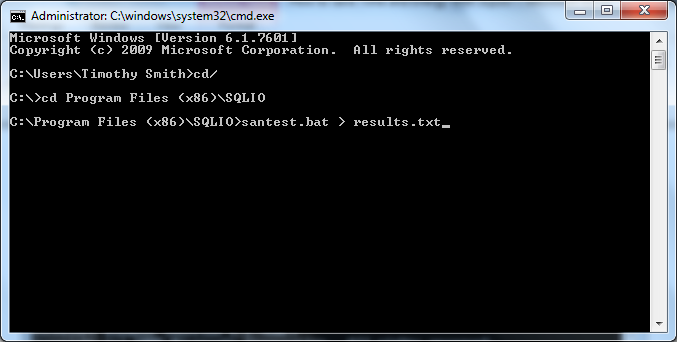
The process will consume some time, but the process of setting up and running the test are complete. The final step is interpreting the results.
How To Interpret the Results
Your interpretation will be contingent on what you want from your system. Recall, that if you have a system or server that is read only, you want to run a read only test. You wouldn’t worry about your system performing poorly with writes, if it’s read-only (and you wouldn’t need to run a writes test).
After you perform the test, your results.txt file should look something like the following when you load it:

Note that each pass from our test batch file produces a block of information produced in the results file (shown in the blue outlined text below this) and if we’re concerned about the capacity, we want to look at the IOs per second and the MBs per second (shown in the red outlined text below this):
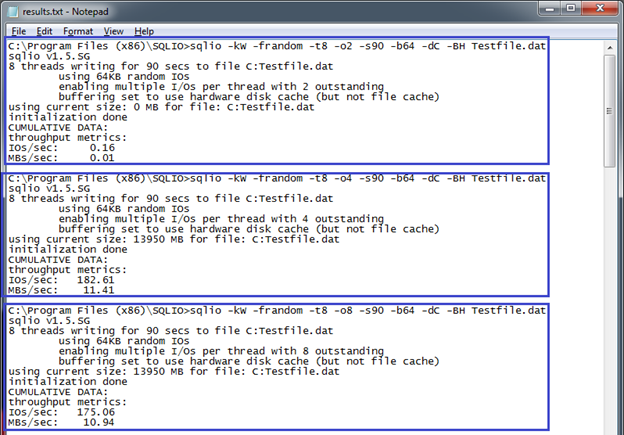
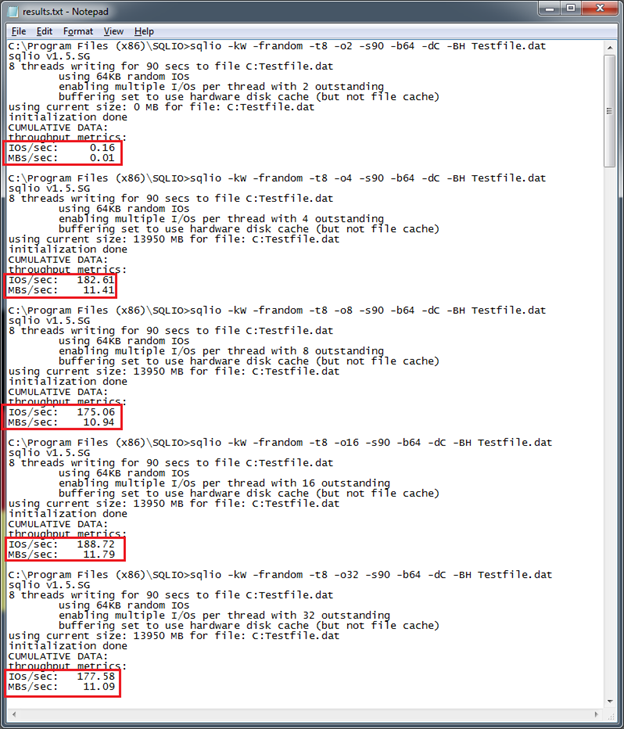
The results file lists the IOs per second and MBs per second (shown in the red outlined square above this).
The Outstanding IO(s) (a category listed in the four tables below this) are determined by the number of threads and outstanding requests on the test batch file (SANTest.bat). For instance, if you have two threads (-t2) and eight outstanding requests (-o8), you would have sixteen (16) IOs. From the test file shown above this, you can see that our thread count remains at eight (-t8) throughout the test, while the outstanding requests begin at two (-o2) through one hundred twenty-eight (-o128).
From the results, we can enter our information into tables. Note, that you can also create a SQL or PowerShell script and have it produce the results in either a database in SQL or Excel document. For the sake of this article, we will only show brief results and how to interpret these (though, for additional information, look at the references at the end).
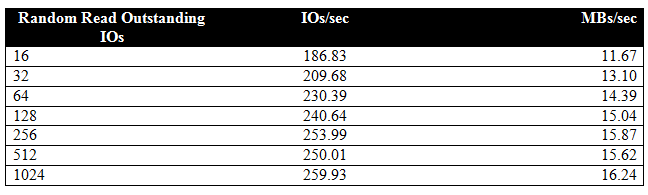
This drive reaches its random read capacity at approximately 250 – 260 IOs per second and 15 – 16 MB per second.
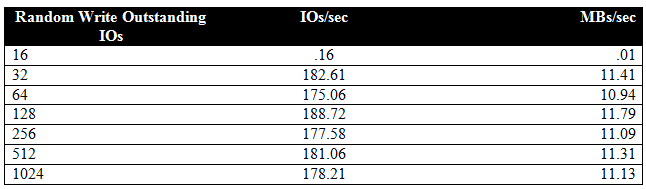
The test drive reaches is random write capacity at approximately 180 to 190 IOs per second and 10 – 11 MB per second.

The test drive reaches its sequential read capacity at approximately 1600 IOs per second and 90 – 100 MB per second.
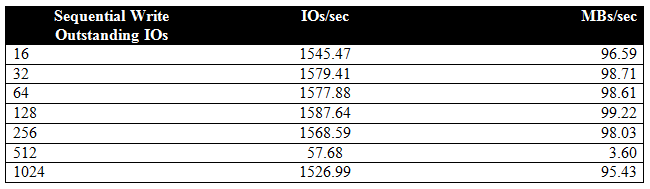
The test drive reaches its sequential read capacity at approximately 1500 IOs per second and 90 – 100 MB per second.
While this test shows us the result of one drive, if we had multiple drives we could begin to analyze which drive could handle certain loads better. If we had a drive, which processed much lower numbers than the test drive listed above this, we wouldn’t place our busiest system on it. Likewise, if we had a drive that processed through put much faster than the test drive above this, we would want our busiest system on it. SQLIO helps us determine what our drives can handle, so that we can build a system which optimizes performance.


0 comments:
Post a Comment