Microsoft Windows Support

  • Subscribe to our RSS feed.
  • Twitter
  • StumbleUpon
  • Reddit
  • Facebook
  • Digg

Wednesday, 18 April 2012

How to Disable Application Switching in Windows 8

Posted on 01:39 by Unknown

How to Disable Application Switching in Windows 8

image
Application switching allows you to quickly switch between your open Metro apps by sliding your finger across the left side of the screen, or moving your mouse to the corner. If you don’t like this behavior, it’s easy to disable.

Disabling Application Switching

Press the Windows + I key combination, when the sidebar appears go ahead and click on the “More PC Settings” section.
When the new “Metro Control Panel” loads you’re going to want to head over to the General Section.
On the right-hand side, you will notice that App switching is enabled by default.
A quick click on the slider is all it takes to disable the feature.
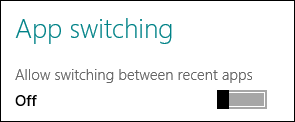
If you go to the top-left corner of your screen you will no longer be able to quickly switch between recent apps.
That’s all there is to it.
Email ThisBlogThis!Share to XShare to FacebookShare to Pinterest
Posted in | No comments
Newer Post Older Post Home

0 comments:

Post a Comment

Subscribe to: Post Comments (Atom)

Popular Posts

Categories

  • 3 D printers
  • 360s
  • amazon
  • android
  • animation
  • apple
  • bing
  • book
  • boxee
  • browser
  • china
  • chrome
  • console
  • dicaprio
  • domain
  • ecommerce
  • facebook
  • ferrari
  • finland
  • gadget
  • galaxy
  • games
  • gmail
  • google
  • hosting
  • HTC
  • internet
  • ipad
  • iphone
  • iphoto
  • iwatch
  • japan
  • keyborad
  • lenovo
  • linux
  • lunar
  • microsoft
  • mobile
  • moon
  • movil
  • ms
  • names
  • new tech
  • Nokia
  • online
  • password
  • pc
  • phone
  • retails
  • samsung
  • search
  • smartphone
  • software
  • space
  • tablet
  • tech
  • text messages
  • track
  • trip
  • usres
  • web
  • whatsapp
  • whois
  • window
  • words
  • xbox

Blog Archive

  • ►  2013 (160)
    • ►  December (1)
    • ►  November (9)
    • ►  September (5)
    • ►  August (8)
    • ►  July (19)
    • ►  June (12)
    • ►  May (23)
    • ►  April (3)
    • ►  March (5)
    • ►  February (18)
    • ►  January (57)
  • ▼  2012 (340)
    • ►  December (25)
    • ►  November (34)
    • ►  October (24)
    • ►  September (27)
    • ►  August (26)
    • ►  July (46)
    • ►  June (83)
    • ►  May (42)
    • ▼  April (33)
      • facebook filed charges against yahoo
      • CISPA bill,:Internet company to handle all your da...
      • Do Cell Phone Causes Cancer
      • Samsung sued over Facebook app
      • Facebook new measures to protect its millions User
      • Facebook is set to become the biggest country in t...
      • A 26years Englishboy hacked facebook and stole fa...
      • sense of direction
      • How To Speed Up Safari browser
      • Online Video Game Grows on the
      • Apple has make new profit as iPhone-iPad sales inc...
      • IPhone 5
      • success vitamins
      • quotes of the day
      • words for motivation
      • Hip-Hop's Wealthiest Artists of 2012
      • Variety Browsers for Your Android Device
      • What would Facebook look like if it had been inven...
      • How To Use the Restore Partition to Break Into a M...
      • How to Back Up Your Linux System With Back In Time
      • How to Use the File History Feature in Windows 8 t...
      • Arthur C. Clarke: The Man who Predicted and Descr...
      • how linux is built
      • Starting Windows 8 with Zero Memory Usage
      • Stress Test the Hard Drives in Your PC or Server
      • How to Multitask in the Linux Terminal: 3 Ways to ...
      • Tweak: the New Multi-Monitor Taskbar in Windows 8
      • How to Lock Down Your Multi-User Computer
      • How to Disable Application Switching in Windows 8
      • computer&Startup:The 10-Minute Website Builder
      • computer&Economics: Argentina Nationalised its Oil
      • wisdom today
      • wisdoms of Life for your living
Powered by Blogger.

About Me

Unknown
View my complete profile