Microsoft Windows Support

  • Subscribe to our RSS feed.
  • Twitter
  • StumbleUpon
  • Reddit
  • Facebook
  • Digg

Friday, 30 November 2012

How To SSH Hop With Key Forwarding from Windows

Posted on 13:40 by Unknown
In this guide we’ll explain how to SSH to a Linux machine from Windows with your public key, using Putty & Winscp. In addition, we will enable the forwarding option. This will allow you to continue to jump from the machine you’ve connected to with your key, to another machine that supports SSHing with keys. We will not go into how to put your public key on the Linux machine,
Install basic programs/packages
  • Obtain the PuTTY package (not just the executable) and install it.
  • Optionally obtain the programs WinSCP and mRemote, and install them.

Generate a Key pair

If you haven’t created a key pair yet, and you want to do it from the comfort of your Windows desktop, you can use “PuTTY Key Generator” which was installed as part of the “PuTTY package“:
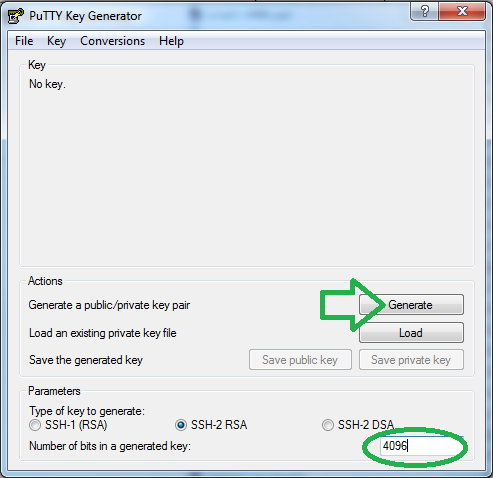
  • Open “PuTTY Key Generator” by going into “Start” -> “PuTTY” -> “PuTTYgen”
  • While not required, it is recommended that you change the length of your key from the default 1024. Change the number of “bits” at the bottom from “1024″ to “4096″.
  • Click “Generate” and move your mouse around randomly until the bar reaches 100%. This “salts“ your key, so try to make your mouse movements as random as possible.
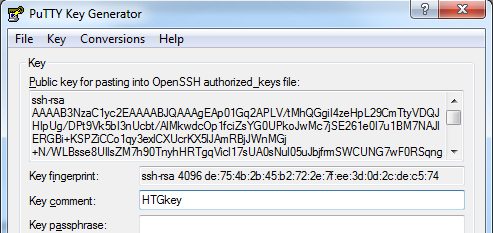
  • Once the program is done generating the key,
  • On the “Key Comment” line, change it to be something more useful like your name. For example:
  • While not required, it is highly recommended that you set a passphrase on the private key. This will protect your private key in case some one gains access to it and you will only be bothered with entering once at machine boot up, if you perform all the steps in the guide.
  • Click on “Save private key”.
Note: If you already have a saved private key, you can “extract” the public portion by “load”ing it with the generator.

Configuring the Key-quartermaster

The “Pageant” program that was installed as part of the PuTTY package, can store your key/s and give them to mRemote, WinSCP and PuTTY as required.
  • Open ”Pageant” from the start menu. (Note: it may run off to the system tray)
  • If it has run off to the system tray, double click it, to bring up the main window.
  • Click “Add Key” and give it your saved Key Pair.
  • If need be, provide the passphrase.
Done, from now on, Putty, WinSCP and any program that serves as a fronted for them (like mRemote) will first consult with the Pageant program if there is a key to use for the connection.
Loading Keys automatically at startup (Optional)
The process above needs to be repeated after every machine reboot, as Pageant doesn’t save loaded key configurations. To have it load the configuration automatically at startup, you can use one of the two methods below:
  1. Assuming you’ve allowed Pageant to take over the ppk suffix, you should be able to simply add the key files to the Windows “startup” folder.
  2. Create a shortcut to the program that passes the key-files as parameters.  For example, the “Target” command for two(2) keys would look like:

    “C:\Program Files (x86)\PuTTY\pageant.exe” “C:\Users\AviadR\Documents\aviad’s 4096.ppk”  ”C:\Users\AviadR\Documents\aviad’s 1024.ppk
  • Then, add this shortcut to window’s startup.
Enable SSH Agent forwarding (PuTTY/mRemote)
This configuration is optional, but doing it will allow you once you’ve SSHed into a machine to continue and SSH from it, to the next machine, with the same key. To do this:
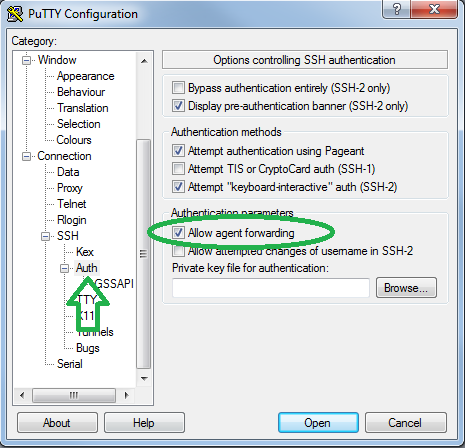
  • Open PuTTY.
  • Under “Connection” -> “SSH” -> “Auth”.
  • Check the “Allow agent forwarding”.
  • Go back to “Session”
  • Select the “Default Settings” entry.
  • Click on “Save”.
  • Done.
Enable SSH Agent forwarding (WinSCP)
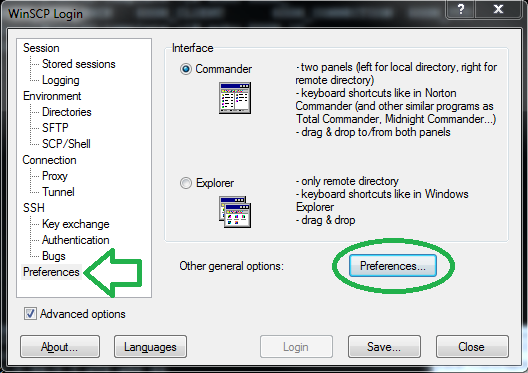
  • In a WinSCP new connection tab, Enable the Advance options checkbox.
  • Go to the “SSH” -> “Authentication”.
  • Check the “Allow agent forwarding” checkbox.
  • Go to the “General Options” by clicking on “Preferences” -> “Preferences”.
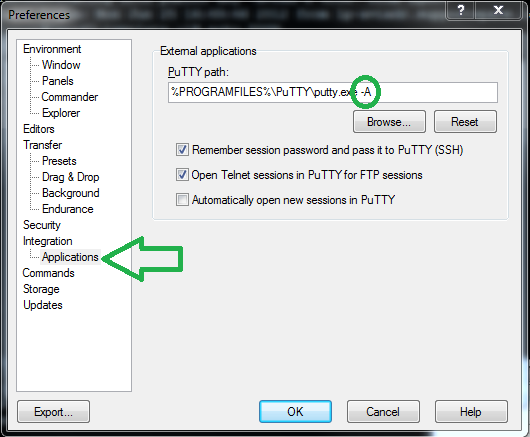
  • Enable Putty to be invoked with the  forwarding option by going into “Integration” -> “Application” and appending the “-A” CLI option.
  • You can now make this the template for subsequent connections by going back to “Session” and typing in, the basic information that you know will be uniform across all connections (if any), like Username, IP, Etc’. Then “save” the session.
Author’s Notes
While purists, will say that any serious SSHing, should be done from a Linux machine, the reality is that Ubuntu’s bug #1 ”Microsoft has a majority desktop market share”, still holds true. maybe one day we’ll move to the Linux desktop completely, but that day will not be today and not for the 35 year old shell.
Email ThisBlogThis!Share to XShare to FacebookShare to Pinterest
Posted in | No comments
Newer Post Older Post Home

0 comments:

Post a Comment

Subscribe to: Post Comments (Atom)

Popular Posts

  • how linux is built
  • Samsung Electronics has bought Boxee
    Samsung Electronics has confirmed its purchase of Boxee on Wednesday for its  smart TVs .  Samsung plans to use this acquisition as a way to...
  • Another Microsoft Guru Steps Down
    Microsoft announced on Monday that company veteran Craig Mundie has stepped down from his post as chief of research and will retire in th...
  • Dr. Dre Top As The New Hip-Hop’s Top Earner
    Six years ago Dr. Dre was walking   for more click here
  • Microsoft new Windows, tablet
    US computing giant Microsoft on Tuesday gave an early peek to the key Chinese market of its new tablet computer and Windows 8 software, pr...
  • Thought words
    “ Greatness lies not in being strong, but in the right using of strength. ” — Henry Ward Beecher
  • How to Move Your Email to Another Mac
    If you use Apple's Mail application, there will probably come a time when you'll want to move your email messages and email account...
  • How To SSH Hop With Key Forwarding from Windows
    In this guide we’ll explain how to SSH to a Linux machine from Windows with your public key, using Putty & Winscp. In addition, we wil...
  • Japan's largest solar and wind power project breaks ground
    Seven Japanese companies have been celebrating the ground breaking of their solar and wind power project at a ceremony held today at the ...
  • How to Recover a Deleted File
    It’s happened to most of us. You delete a file and realize you need it back. This guide will explain when you can get that file back and how...

Categories

  • 3 D printers
  • 360s
  • amazon
  • android
  • animation
  • apple
  • bing
  • book
  • boxee
  • browser
  • china
  • chrome
  • console
  • dicaprio
  • domain
  • ecommerce
  • facebook
  • ferrari
  • finland
  • gadget
  • galaxy
  • games
  • gmail
  • google
  • hosting
  • HTC
  • internet
  • ipad
  • iphone
  • iphoto
  • iwatch
  • japan
  • keyborad
  • lenovo
  • linux
  • lunar
  • microsoft
  • mobile
  • moon
  • movil
  • ms
  • names
  • new tech
  • Nokia
  • online
  • password
  • pc
  • phone
  • retails
  • samsung
  • search
  • smartphone
  • software
  • space
  • tablet
  • tech
  • text messages
  • track
  • trip
  • usres
  • web
  • whatsapp
  • whois
  • window
  • words
  • xbox

Blog Archive

  • ►  2013 (160)
    • ►  December (1)
    • ►  November (9)
    • ►  September (5)
    • ►  August (8)
    • ►  July (19)
    • ►  June (12)
    • ►  May (23)
    • ►  April (3)
    • ►  March (5)
    • ►  February (18)
    • ►  January (57)
  • ▼  2012 (340)
    • ►  December (25)
    • ▼  November (34)
      • How To SSH Hop With Key Forwarding from Windows
      • Japan sends Robots to Space
      • Microsoft Surface Pro to start at $899
      • US Senate panel passes email privacy measure
      • Samsung launches new Internet-connected camera
      • Japan mobile phone will monitor skin condition
      • Justin Bieber Meeting With Canadian Prime Minister...
      • Facebook adds iTunes credits in gift service
      • Is Facebook going like Google on User privacy Info...
      • How to Change the Default Save Location for Office...
      • Japanese High tech toilet
      • IMF chief says SMS tax could help Philippines
      • Free Mini ipad
      • Camera that can see through your skin,around corner
      • Japan's largest solar and wind power project break...
      • Facebook new product: threading comment
      • Music streaming in 2012
      • iPhone 5S to be launched early 2013
      • Black berry 10 will be lunched january 30, 2013
      • HTC and Apple reach global settlement
      • Australian wins $208k from Google for gang links
      • Internet in Space, outside the earth(DTN).
      • China will launch next manned spaceship in 2013
      • Japan plans new carrier rocket launch in 2013
      • UK to increase its Space budget spending
      • Microsoft Office in Android and iOS in 2013
      • Is Apple losing Innovations?
      • The new Master Card, has a screen and keybaord
      • Aircrafts you will be seeing in 2050
      • Messenger live to be replaced by Skype: Microsoft
      • Smartype Keyboard with screen, hosts widgets such ...
      • China sends execs to isreal to learn Tech Innovation
      • fighter roars off on maiden flight on First chines...
      • China's largest unmanned helicopter is now into se...
    • ►  October (24)
    • ►  September (27)
    • ►  August (26)
    • ►  July (46)
    • ►  June (83)
    • ►  May (42)
    • ►  April (33)
Powered by Blogger.

About Me

Unknown
View my complete profile